Measurement's report FRANSUN T2 (AB136D) - Reference Audio Analyzer

FRANSUN T2 (AB136D)

About this report
This is a report for professionals with a suite of tests for line output devices. Alternative version of the report for "dummies" in development.

A suite of tests for the line-out can be used for headphone or speaker output if in this mode it is possible to use the device as a source for connecting an external amplifier or if such a test suite can give more information about the implementation of the DAC in the device.

Line-out, differences from the output for headphones and speakers
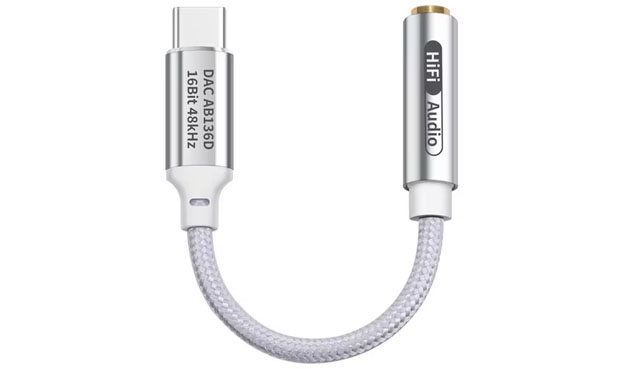


Test report - general data FRANSUN T2 (AB136D) (as Line Out mode)

Your browser does not support Canvas

Max voltage output at 0 dBFS6.4dBV
2.1VRMS


General data - Signal/Noise
RMS dBFS (C) dBFS (A) dBFS 22 - 22k UNW
Left Right Left Right Left Right Left Right
Signal/Noise, dB -82.03 -81.71 -85.05 -84.66 -85.05 -84.76 -82.05 -81.76
Noise floor level, dBV -75.62 -75.30 -78.64 -78.25 -78.64 -78.35 -75.64 -75.35
Noise floor level, µVRMS 165.61 171.83 116.97 122.35 116.97 120.95 165.23 170.84
Optimal range of volume control, dB 12.03 11.71 15.05 14.66 15.05 14.76 12.05 11.76
Maximum level at 0 dBFS, dBV 6.41 6.41

Brief information

Clicking on the graph will take you to the comparison page of different models with advanced graph display settings.


Frequency response FRANSUN T2 (AB136D) (as Line Out mode)

Your browser does not support Canvas
Graphics setting view
Channel

Range

Frequency band

Type test:


Brief information

Clicking on the graph will take you to the comparison page of different models with advanced graph display settings.


Impulse response FRANSUN T2 (AB136D) (as Line Out mode)

Your browser does not support Canvas
Graphics setting view
Channel

Duration for impulse

Your browser does not support Canvas
Graphics setting view
Channel

Duration for impulse


Brief information

Clicking on the graph will take you to the comparison page of different models with advanced graph display settings.


Aliasing FRANSUN T2 (AB136D) (as Line Out mode)

Your browser does not support Canvas
Graphics setting view
Channel

Range

Type test:

Frequency band


Brief information

Clicking on the graph will take you to the comparison page of different models with advanced graph display settings.


Harmonic Distortion vs Level FRANSUN T2 (AB136D) (as Line Out mode)

Your browser does not support Canvas
Graphics setting view
Channel

Comparison by

Harmonic, number

Range


Brief information

Clicking on the graph will take you to the comparison page of different models with advanced graph display settings.


Crosstalk FRANSUN T2 (AB136D) (as Line Out mode)

Your browser does not support Canvas
Graphics setting view
Channel

Range

Your browser does not support Canvas
Graphics setting view
Channel


Brief information

Clicking on the graph will take you to the comparison page of different models with advanced graph display settings.


Spectrum of Total Harmonic Distortion (THD) FRANSUN T2 (AB136D) (as Line Out mode)

Your browser does not support Canvas
Graphics setting view
Channel

Level @ dBFS

Range

Your browser does not support Canvas
Graphics setting view
Channel

Level @ dBFS

Range


Brief information

Clicking on the graph will take you to the comparison page of different models with advanced graph display settings.


Spectra FRANSUN T2 (AB136D) (as Line Out mode)

Spectrum of Dynamic Range (-60 dBFS)

Your browser does not support Canvas
Graphics setting view
Channel

Range

Sine low ammplitude spectrum -90 dBFS

Your browser does not support Canvas
Graphics setting view
Channel

Range


Brief information

Clicking on the graph will take you to the comparison page of different models with advanced graph display settings.


Spectrum of Multitone Distortion FRANSUN T2 (AB136D) (as Line Out mode)

Your browser does not support Canvas
Graphics setting view
Channel

Range

Level @ dBFS

Range

Your browser does not support Canvas
Graphics setting view
Channel

Range

Level @ dBFS

Range


Brief information

Clicking on the graph will take you to the comparison page of different models with advanced graph display settings.


Spectrum of Intermodulation Distortion (IMD) - SMPTE FRANSUN T2 (AB136D) (as Line Out mode)

Your browser does not support Canvas
Graphics setting view
Channel

Level @ dBFS

Range

Range

Your browser does not support Canvas
Graphics setting view
Channel

Level @ dBFS

Range

Range


Brief information

Clicking on the graph will take you to the comparison page of different models with advanced graph display settings.


Spectrum of Intermodulation Distortion (IMD) - CCIF FRANSUN T2 (AB136D) (as Line Out mode)

Your browser does not support Canvas
Graphics setting view
Channel

Level @ dBFS

Range

Your browser does not support Canvas
Graphics setting view
Channel

Level @ dBFS

Range


Brief information

Clicking on the graph will take you to the comparison page of different models with advanced graph display settings.


Spectrum of Noise Distortion FRANSUN T2 (AB136D) (as Line Out mode)

Your browser does not support Canvas
Graphics setting view
Channel

Level @ dBFS

Range

Your browser does not support Canvas
Graphics setting view
Channel

Level @ dBFS

Range


Brief information

Clicking on the graph will take you to the comparison page of different models with advanced graph display settings.


Spectrum of Jitter FRANSUN T2 (AB136D) (as Line Out mode)

Your browser does not support Canvas
Graphics setting view
Channel

Range

Range

Range


Brief information

Clicking on the graph will take you to the comparison page of different models with advanced graph display settings.


Checking for correctness of reproduction signals depth more than 16-bit FRANSUN T2 (AB136D) (as Line Out mode)

Your browser does not support Canvas
Graphics setting view
Channel

Range


Brief information

Clicking on the graph will take you to the comparison page of different models with advanced graph display settings.


Waveforms / Spectra FRANSUN T2 (AB136D) (as Line Out mode)

Your browser does not support Canvas
Graphics setting view
Channel

Range

Your browser does not support Canvas
Graphics setting view
Channel

Range

Type test:

Frequency band


Brief information

Clicking on the graph will take you to the comparison page of different models with advanced graph display settings.


More detailed

Measurements of FRANSUN T2 (AB136D) were carried out by Roman Kuznetsov on the hardware-software complex RAA.

The FRANSUN T2 (AB136D) test was conducted as a black box test, without regard to cost and prestige. This is the basic principle for making measurements, measurement reports and developing tests in RAA.


Kuznetsov Roman
Founder of RAA


Known by the nickname romanrex
Аuthor of articles iXBT.com


Information for Authors. You can freely use the graphics in your articles with a link to us.


Original text in Russian page. Translation page is not yet ready

You can help with translation via the: facebook and feedback.


TT

Comments

No comments to FRANSUN T2 (AB136D)
Commentary view:


Want to leave a comment or ask a question? Register now or log in