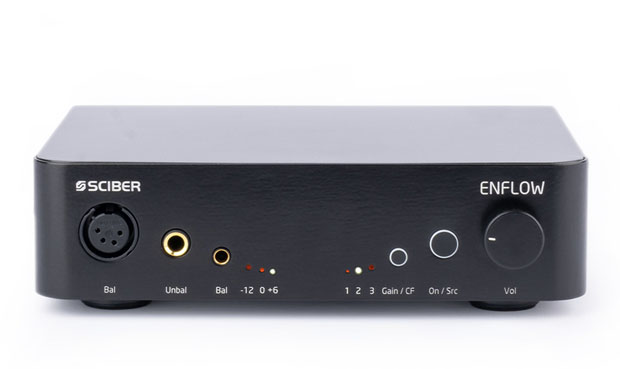
Measurement's report Sciber Enflow - Reference Audio Analyzer

Sciber Enflow

About this report
This is a report for professionals with a suite of test of headphone amplifier.
You can see a simple report for "dummies" with explanations of the main characteristics for Sciber Enflow

A suite of tests for a headphone amplifier can be applied to just a universal output without a formal presence of an amplifier, if in this mode you can connect headphones to this output. Based on the results of the tests, you can understand the real picture, is the output powerful enough or not, with the initial data on the circuitry as a "black box".

Line-out, differences from the output for headphones and speakers

Advantages and disadvantages of balanced amplifiers
Test report - general data Sciber Enflow (as headphone amplifier)

Frequency response, Impedance and Frequency response with standard headphones

Your browser does not support Canvas

Voltage levels from the load at the output of the amplifier

Your browser does not support Canvas

The main parameters of the universal block diagram of the amplifier
Average value of impedance band in 40 Hz - 15 kHz0.1ohm
Voltage:
Linear Mode / Maximum or before clipping level
18.7/18.7dBV
8.6/8.6VRMS
Current:
Linear Mode / Maximum or before clipping level
53.6/53.6dB(mA)
479.5/479.5mA


Brief information

Clicking on the graph will take you to the comparison page of different models with advanced graph display settings.


Frequency response Sciber Enflow (as headphone amplifier)

Your browser does not support Canvas
Graphics setting view
Channel

Range

Channel:LeftRight
Variation in frequency response in band from 40 Hz - 15 kHz -0.1, +0.0-0.1, +0.0dB


Brief information

Clicking on the graph will take you to the comparison page of different models with advanced graph display settings.

On the frequency response comparison page, there is an export option and additional tools for adjusting the frequency response


Impedance Sciber Enflow (as headphone amplifier)

Your browser does not support Canvas
Graphics setting view
Channel

Channel:LeftRight
Impedance average in band from 40 Hz - 15 kHz0.1 0.1ohm
The minimum value in band from 40 Hz - 15 kHz0.1 0.1ohm
The maximum value in band from 40 Hz - 15 kHz0.1 0.1ohm


Comparison of basic characteristics AMPs


Brief information

Clicking on the graph will take you to the comparison page of different models with advanced graph display settings.


Crosstalk Sciber Enflow (as headphone amplifier)

Your browser does not support Canvas
Graphics setting view
Channel

Range

Load

Channel:LeftRight
Crosstalk @ 1 kHz @ 15.8 ohm -78.2 -78.1dB
Crosstalk @ 1 kHz @ 24.5 ohm -82.0 -82.0dB
Crosstalk @ 1 kHz @ 30.5 ohm -84.1 -84.2dB
Crosstalk @ 1 kHz @ 62.4 ohm -91.3 -91.3dB
Crosstalk @ 1 kHz @ 100.0 ohm -94.3 -95.2dB
Crosstalk @ 1 kHz @ 198.9 ohm -104.2 -101.6dB
Crosstalk @ 1 kHz @ 300.0 ohm -103.1 -102.7dB
Crosstalk @ 1 kHz @ 763.0 ohm -103.8 -99.8dB
Crosstalk @ 1 kHz @ Not loaded-102.4 -101.8dB


Brief information

Clicking on the graph will take you to the comparison page of different models with advanced graph display settings.


Crosstalk Phase Sciber Enflow (as headphone amplifier)

Your browser does not support Canvas
Graphics setting view
Channel

Load


Brief information

Clicking on the graph will take you to the comparison page of different models with advanced graph display settings.


Frequency response Sciber Enflow with resistive load

Your browser does not support Canvas
Graphics setting view
Channel

Range

Frequency response of amplifier with resistive load @ 40 Hz - 15 kHz
Channel:LeftRight
TEST 16 ? + Sciber Enflow 0.00.0dB
TEST 32 ? + Sciber Enflow 0.00.0dB
TEST 64 ? + Sciber Enflow 0.00.0dB
TEST 126 ? + Sciber Enflow 0.00.0dB
TEST 256 ? + Sciber Enflow 0.00.0dB
TEST 512 ? + Sciber Enflow 0.00.0dB


Brief information

Clicking on the graph will take you to the comparison page of different models with advanced graph display settings.

On the frequency response comparison page, there is an export option and additional tools for adjusting the frequency response


Frequency response Sciber Enflow loaded dynamic headphone type

Your browser does not support Canvas
Graphics setting view
Channel

Range

Frequency response of amplifier loaded dynamic headphone type @ 40 Hz - 15 kHz
Channel:LeftRight
TEST 10000 ? + Sciber Enflow 0.00.0dB
Grado GH4 Limited Edition + Sciber Enflow 0.00.0dB


Brief information

Clicking on the graph will take you to the comparison page of different models with advanced graph display settings.

On the frequency response comparison page, there is an export option and additional tools for adjusting the frequency response


Frequency response Sciber Enflow loaded type balance armature headphone type

Your browser does not support Canvas
Graphics setting view
Channel

Range

Frequency response of amplifier loaded type balance armature headphone type @ 40 Hz - 15 kHz
Channel:LeftRight
TEST 10000 ? + Sciber Enflow 0.00.0dB
Campfire Audio Andromeda + Sciber Enflow 0.30.3dB
Fearless Audio S8F Freedom + Sciber Enflow 0.20.2dB


Brief information

Clicking on the graph will take you to the comparison page of different models with advanced graph display settings.

On the frequency response comparison page, there is an export option and additional tools for adjusting the frequency response


THD vs load vs output voltage Sciber Enflow

Your browser does not support Canvas
Graphics setting view
Channel

Load

Harmonic, number

Range

Your browser does not support Canvas
Graphics setting view
Channel

Load

Harmonic, number

Range

Your browser does not support Canvas
Graphics setting view
Channel

Load

Range


Brief information

Clicking on the graph will take you to the comparison page of different models with advanced graph display settings.


Maximum voltage output level vs load Sciber Enflow

Your browser does not support Canvas
Graphics setting view
Type of chart

RAW coordinates

Power characteristics of the Voltage Current
dBVVRMSdB(mA)mA
Linear Mode18.78.653.6479.5
Optimal Mode18.78.653.6479.5
Hard Mode18.78.653.6479.5
Maximum mode 18.78.653.6479.5


Volume Control TypeAnalog
Optimal range of volume control56.0dB


Comparison Sciber Enflow and another amplifiers by loudness (Volume Level)

Main characteristics of the Sciber Enflow


Brief information

Clicking on the graph will take you to the comparison page of different models with advanced graph display settings.


Maximum voltage output level vs load Sciber Enflow

Your browser does not support Canvas
Graphics setting view
Type of chart

RAW coordinates

Maximum Amplifier Voltage Level
Load Linear ModeOptimal ModeHard ModeMax, before clipping
dBVVRMSdBVVRMSdBVVRMSdBVVRMS
15.8 ohm 17.67.617.67.617.67.617.67.6
24.5 ohm 17.67.617.67.617.67.617.67.6
30.5 ohm 17.67.617.67.617.67.617.67.6
62.4 ohm 18.48.318.48.318.48.318.48.3
100 ohm 18.78.618.78.618.78.618.78.6
198.9 ohm 16.26.416.26.416.26.416.26.4
300 ohm 16.26.416.26.416.26.416.26.4
763 ohm 18.78.618.78.618.78.618.78.6
Not loaded18.78.618.78.618.78.618.78.6


Maximum level of amplifier current
Load Linear ModeOptimal ModeHard ModeMax, before clipping
dB(mA)mAdB(mA)mAdB(mA)mAdB(mA)mA
15.8 ohm 53.6479.553.6479.553.6479.553.6479.5
24.5 ohm 49.8309.549.8309.549.8309.549.8309.5
30.5 ohm 47.9248.447.9248.447.9248.447.9248.4
62.4 ohm 42.5133.842.5133.842.5133.842.5133.8
100 ohm 38.785.738.785.738.785.738.785.7
198.9 ohm 30.232.330.232.330.232.330.232.3
300 ohm 26.621.426.621.426.621.426.621.4
763 ohm 21.011.221.011.221.011.221.011.2


Power
Load Linear ModeOptimal ModeHard ModeMax, before clipping
dBmmWdBmmWdBmmWdBmmW
15.8 ohm 35.63632.435.63632.435.63632.435.63632.4
24.5 ohm 33.72347.233.72347.233.72347.233.72347.2
30.5 ohm 32.71881.932.71881.932.71881.932.71881.9
62.4 ohm 30.51117.030.51117.030.51117.030.51117.0
100 ohm 28.7733.828.7733.828.7733.828.7733.8
198.9 ohm 23.2207.623.2207.623.2207.623.2207.6
300 ohm 21.4137.721.4137.721.4137.721.4137.7
763 ohm 19.896.219.896.219.896.219.896.2


Brief information

Clicking on the graph will take you to the comparison page of different models with advanced graph display settings.


Spectrum of Total Harmonic Distortion vs Level Sciber Enflow (as headphone amplifier)

Your browser does not support Canvas
Graphics setting view
Channel

Level

Range

Your browser does not support Canvas
Graphics setting view
Channel

Level

Range

Your browser does not support Canvas
Graphics setting view
Channel

Shift

dBm

Range

Your browser does not support Canvas
Graphics setting view
Channel

Shift

dBV

Range


Brief information

Clicking on the graph will take you to the comparison page of different models with advanced graph display settings.


Spectrum of Multitone Distortion vs Level vs Load Sciber Enflow (as headphone amplifier)

Your browser does not support Canvas
Graphics setting view
Channel

Level

Range

Your browser does not support Canvas
Graphics setting view
Channel

Level

Range

Your browser does not support Canvas
Graphics setting view
Channel

Shift

dBm

Range

Your browser does not support Canvas
Graphics setting view
Channel

Shift

dBV

Range


Brief information

Clicking on the graph will take you to the comparison page of different models with advanced graph display settings.


Spectrum of IMD SMPTE vs Level Sciber Enflow (as headphone amplifier)

Your browser does not support Canvas
Graphics setting view
Channel

Level

Range

Range

Your browser does not support Canvas
Graphics setting view
Channel

Level

Range

Range

Your browser does not support Canvas
Graphics setting view
Channel

Shift

Range

dBm

Range

Your browser does not support Canvas
Graphics setting view
Channel

Shift

Range

dBV

Range


Brief information

Clicking on the graph will take you to the comparison page of different models with advanced graph display settings.


Spectrum of IMD CCIF vs Level Sciber Enflow (as headphone amplifier)

Your browser does not support Canvas
Graphics setting view
Channel

Level

Range

Your browser does not support Canvas
Graphics setting view
Channel

Level

Range

Your browser does not support Canvas
Graphics setting view
Channel

Shift

dBm

Range

Your browser does not support Canvas
Graphics setting view
Channel

Shift

dBV

Range


Brief information

Clicking on the graph will take you to the comparison page of different models with advanced graph display settings.


More detailed

Measurements of Sciber Enflow were carried out by Roman Kuznetsov on the hardware-software complex RAA.

The Sciber Enflow test was conducted as a black box test, without regard to cost and prestige. This is the basic principle for making measurements, measurement reports and developing tests in RAA.

I believe that it is important to do not make an absolute assessment of the device, but an aggregate assessment when working together with a headphones and taking into account external factors. This allows you to effectively reveal the potential of the entire set of devices or to make a more optimal choice of components.


Kuznetsov Roman
Founder of RAA


Known by the nickname romanrex
Аuthor of articles iXBT.com


Information for Authors. You can freely use the graphics in your articles with a link to us.


Original text in Russian page. Translation page is not yet ready

You can help with translation via the: facebook and feedback.


Comments

No comments to Sciber Enflow
Commentary view:


Want to leave a comment or ask a question? Register now or log in